Short answer: llms.txt is a plain Markdown file placed at yoursite.com/llms.txt that gives AI tools a short summary of your site and a curated list of links to your most useful pages. It was proposed by Jeremy Howard of Answer.AI in September 2024 and updated to version 2 in August 2026. It is a community proposal, not an official standard. Google Search does not use it, and most published files are never requested, but AI coding agents do read it. It is cheap to add, so treat it as a small extra, not an SEO tactic.
llms.txt is one of the most talked-about files in AI search, and one of the most misunderstood. Some guides call it the robots.txt of AI. Others say it is useless. The truth sits in between, and it depends on what kind of site you run.
This guide explains what llms.txt is, what goes in the file, what changed in version 2, what Google and real traffic data say about it, and how to decide whether your site needs one. Every claim was checked against the proposal itself, Google’s documentation and published studies in November 2026.
Key takeaways
- llms.txt is a reading guide for AI tools, written in Markdown and placed at the root of a website.
- It does not control or block crawlers. That is still the job of robots.txt.
- Only one part is required: an H1 heading with the name of the site or project.
- Version 2 (August 2026) added standard ways for agents to find the file and Markdown copies of pages.
- Google Search does not use it, for rankings, AI Overviews or AI Mode, and says it neither helps nor hurts.
- Real usage is small. In an Ahrefs study of 137,210 domains, 97% of llms.txt files received no requests at all in May 2026.
- The clearest use case is developer documentation, where AI coding agents look for a clean map of the docs.
What is llms.txt?
llms.txt is a text file, written in Markdown, that sits at the root of a website, for example example.com/llms.txt. It gives large language models (LLMs) and AI agents a short description of the site and a hand-picked list of links to the pages that matter most.
The idea came from a practical problem. A web page is full of menus, scripts, adverts and layout code that an AI tool has to strip away before it can read the actual content. A model also has limited space for text in a single request (its context window, measured in tokens), so reading a whole website is wasteful. llms.txt gives the tool a compact starting point instead.
Jeremy Howard, co-founder of fast.ai and founding CEO of Answer.AI, published the proposal on 3 September 2024 at llmstxt.org. He framed it as a way to help AI tools use a website at inference time, meaning when a tool is answering a question or doing a task, rather than as a way to supply training data.
Two points are worth stating clearly. First, llms.txt is a proposal. It is maintained on GitHub and discussed in a community Discord, but it has not been adopted by a standards body such as the IETF or W3C. Second, it is not an access-control file. If you want to allow or block AI crawlers, you still do that in robots.txt. Our guide to AI crawlers explains how those crawlers work and how to manage them.
llms.txt vs robots.txt vs sitemap.xml
The three files are often mentioned together, but they do different jobs:
| robots.txt | sitemap.xml | llms.txt | |
|---|---|---|---|
| Main job | Tells crawlers what they may and may not crawl | Lists the pages you want search engines to find | Gives AI tools a short, curated guide to your best content |
| Format | Plain text rules | XML | Markdown |
| Who reads it | Search engine and AI crawlers | Search engine crawlers | Mainly AI coding agents and some AI crawlers |
| Status | Internet standard (RFC 9309) | Widely supported protocol (sitemaps.org) | Community proposal (llmstxt.org) |
| Can it block bots? | Yes, for bots that follow it | No | No |
| Should it list every page? | Not applicable | Yes, every indexable page | No, only the pages that help most |
The last row is where most people go wrong. A sitemap aims to be complete. An llms.txt file aims to be selective, like the contents page of a good manual.
What goes in an llms.txt file
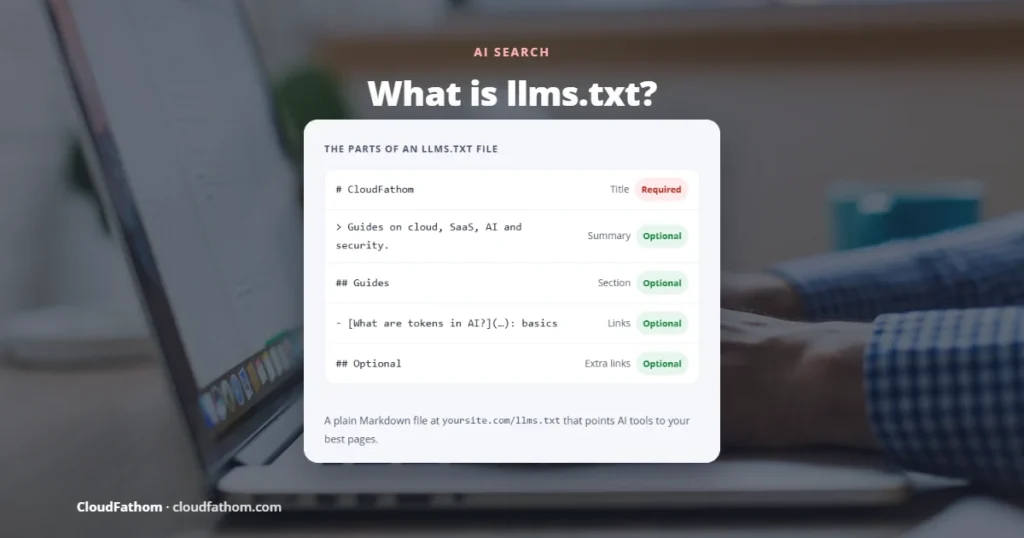
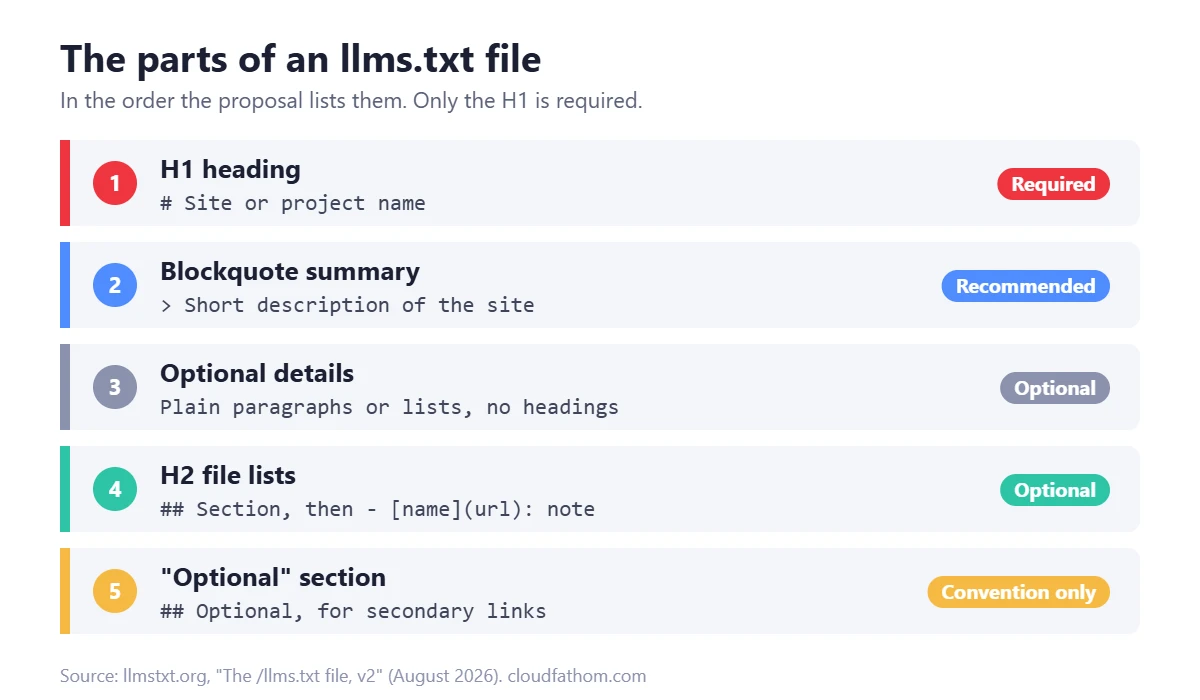
The format is deliberately simple. The proposal lists the parts in this order:
- An H1 heading with the name of the site or project. This is the only required part.
- A blockquote with a short summary containing the key information a reader needs to understand the rest of the file.
- Optional details: paragraphs or lists (but no headings) explaining the project or how to use the linked pages.
- Zero or more H2 sections, each containing a “file list”: a Markdown list of links in the form
[name](url), optionally followed by a colon and a short note.
Here is a simple example for an imaginary accounting software company:
# Ledgerly> Ledgerly is online accounting software for small businesses. This file lists the pages that best explain our product, pricing and API.## Product- [Features](https://ledgerly.example/features.md): what the software does- [Pricing](https://ledgerly.example/pricing.md): plans and what each includes## Developers- [API reference](https://ledgerly.example/docs/api.md): endpoints and authentication- [Webhooks](https://ledgerly.example/docs/webhooks.md): events and retries## Optional- [Changelog](https://ledgerly.example/changelog.md): release history
The links in the example point to .md files. The proposal encourages sites to publish clean Markdown copies of important pages, because they are easier for AI tools to read than full HTML. This is recommended, not required: a file that links to normal web pages still follows the format.
What is llms-full.txt?
You will often see a second file called llms-full.txt. It contains the full text of a site’s key pages joined into one file, so a tool can load everything in a single request. It became common after documentation platforms such as Mintlify began generating it automatically. It is a community convention rather than part of the llms.txt proposal itself, so tools may or may not look for it.
What changed in llms.txt version 2 (August 2026)
In August 2026, Howard published the first revision of the proposal, now titled “The /llms.txt file, v2”. He explained that thousands of sites now publish the file and that coding agents use it reliably, and the update reflects that experience. The main changes are:
- Two ways to name Markdown pages. Version 1 used one pattern, adding
.mdto the full URL (page.html.md). Version 2 also allows replacing the extension (page.md). - Standard discovery links. A page can point to its Markdown copy with
rel="alternate" type="text/markdown", and to the llms.txt file that covers it withrel="describedby". Both can be added as HTML<link>elements or as an HTTPLinkheader. - Clear rules for subfolders. A file can sit at the root or in any path, and covers the pages under that path. Where more than one applies, the most specific file wins. This lets someone who only controls part of a site, such as a GitHub Pages project, publish one.
- How agents should use it. Agents are expected to view or search the llms.txt file, then follow the relevant links.
- “Optional” is now just a convention. An H2 section called Optional is still allowed for secondary links, but tools no longer give it a special meaning.
- Context-expansion tooling removed. The
llms_txt2ctxtool for turning a file into one large block of text is no longer part of the proposal.
If you already have a version 1 file, it does not need rebuilding. The changes are mainly about helping agents find the file and your Markdown pages.
Does llms.txt help SEO or AI search?
This is the question most people actually care about, so here is what the evidence shows.
What Google says
Google has been consistent. In April 2025, Google’s John Mueller compared llms.txt to the old keywords meta tag: a site owner’s own claim about what a site is about, which a system would have to check against the real pages anyway. In July 2025, Gary Illyes of Google said at a Search Central Live event that Google does not support llms.txt and has no plans to.
In May 2026, Google published a guide to optimising for generative AI features in Search. It lists llms.txt among things you do not need, saying you do not have to create new machine-readable files, AI text files or Markdown to appear in Google Search, including its AI features. On 15 June 2026, Google added a note clarifying that these files neither help nor hurt rankings, and that it is fine to create them for other services that use them.
What Google Chrome does
There is one twist. In May 2026, Chrome’s Lighthouse audit tool (version 13.3) added an experimental Agentic Browsing category, and one of its checks looks for an llms.txt file. The check is narrow: if the file is missing and the server returns a 404, the audit is marked as not applicable. It is flagged only if a server error occurs when fetching it. This is about helping AI agents that browse a site, not about Search rankings.
What real traffic data shows
The largest study so far comes from Ahrefs, published on 15 June 2026. It looked at server logs and live traffic for 137,210 domains in May 2026:
- 28% of the domains published an llms.txt file. Ahrefs notes its customers are more technical than average, so the real share across the web is likely lower.
- 97% of those files received no requests at all during the month, from bots or humans.
- Of the requests that did arrive, 96% came from bots, and named AI tools made up about 19.5%. GPTBot was the top AI fetcher and Claude-Code, an AI coding agent, was second, ahead of every AI search and assistant bot.
- About 12% of requests came from tools that audit or study llms.txt files rather than use them.
Put simply: publishing llms.txt is not a way to get cited more by AI search engines. Its real audience today is AI coding agents and some training crawlers. If you want to know which AI bots actually reach your site, our free AI Crawler Checker shows which ones your robots.txt allows or blocks.
Should you create an llms.txt file?
It depends on your site. A simple way to decide:
| Type of site | Worth adding? | Why |
|---|---|---|
| Developer docs, APIs, SDKs | Yes | AI coding agents are the main readers of these files, and a clean map of your docs helps them |
| SaaS product sites | Probably | A short guide to features, pricing and docs costs little and may help agents answering product questions |
| Blogs and publishers | Optional | Low cost, but little evidence of benefit; good content and normal SEO matter far more |
| Local businesses and small shops | Low priority | Fix your Google Business Profile, site speed and content first |
If you do add one, keep expectations modest. The cost is a few minutes of work and a little maintenance. The benefit is helping a small but growing group of AI agents read your site more easily. It will not lift your Google rankings, and it will not stop any bot from crawling.
How to create an llms.txt file in 5 steps
- Pick your most useful pages. Start with 10 to 50 pages that best explain what you offer: key product, service or documentation pages, pricing, and your best guides. Leave out tag pages, search results, login pages and thin content.
- Write the H1 and summary. Use your site or project name as the H1, then a one- or two-sentence blockquote that says plainly what the site is and who it is for.
- Group links into H2 sections. Use clear section names such as Product, Guides or Developers. Add a short note after each link explaining what the reader will find there.
- Save it as plain text at the root. Name it
llms.txt, encode it as UTF-8 and upload it so it loads atyoursite.com/llms.txt. Check that it returns the text itself, not a web page or a redirect. - Keep it up to date. Update the file when you add, rename or remove important pages. A file full of broken links is worse than no file.
If you would rather not write it by hand, our free llms.txt generator scans your homepage, robots.txt and sitemaps, lets you choose which pages to include, checks the links and produces a file in the correct format.
On WordPress, you can upload the file to your site’s root folder using your host’s file manager or FTP. Some SEO plugins can also generate one for you. Whichever method you use, open the URL in a browser afterwards to make sure it loads as text.
Common mistakes to avoid
- Treating it like a sitemap. Dumping every URL into the file defeats the point. Curate.
- Expecting it to block AI crawlers. It cannot. Use robots.txt rules for GPTBot, ClaudeBot and other bots.
- Skipping the summary. Only the H1 is required, but the blockquote is what tells an AI tool what your site is about.
- Serving the wrong thing. The URL should return the Markdown file. A redirect to an HTML page or a soft 404 means tools will not find it.
- Saying something different from your pages. The file should match what your site actually says. Using it to show AI tools different content from what people see is the kind of trick search engines have always treated as spam.
- Auto-generating it and forgetting it. If a plugin builds the file, check what it includes. Ahrefs’ study noted a crawler researching llms.txt files as a possible route for prompt injection, so make sure nothing unexpected ends up in it. Our guide to AI cloud security covers prompt injection and other AI risks.
Frequently asked questions
What is llms.txt in simple terms?
It is a short Markdown file at yoursite.com/llms.txt that tells AI tools what your site is about and links to your most useful pages, so they can find the right content quickly.
Is llms.txt an official standard?
No. It is a community proposal published by Jeremy Howard of Answer.AI in September 2024 and updated to version 2 in August 2026. It has not been adopted by a standards body.
Does Google use llms.txt?
No. Google says Google Search, including AI Overviews and AI Mode, does not use llms.txt, and that the file neither helps nor hurts rankings. Chrome’s Lighthouse tool does include an experimental llms.txt check for AI agents.
Is llms.txt the same as robots.txt?
No. robots.txt tells crawlers what they are allowed to crawl. llms.txt is only a reading guide and cannot block or allow anything. To see what your own robots.txt allows, try our free robots.txt tester.
Do ChatGPT and Claude read llms.txt?
Some OpenAI and Anthropic bots do request it. In Ahrefs’ June 2026 study, GPTBot and the Claude-Code coding agent were the top AI fetchers. But no major AI company has said that having the file improves how often your site is cited.
Where do I put my llms.txt file?
At the root of your domain, so it loads at yoursite.com/llms.txt. Version 2 also allows files in subfolders, which cover the pages under that folder.
What is the difference between llms.txt and llms-full.txt?
llms.txt is a short index of links. llms-full.txt is a convention for a single file containing the full text of your key pages. Only llms.txt is described in the proposal.
Sources
- llmstxt.org: The /llms.txt file, v2 (Jeremy Howard)
- llmstxt.org: Changes in v2 (August 2026)
- Google Search Central: Optimizing your website for generative AI features on Google Search
- Search Engine Roundtable: Google says llms.txt files will not help or hurt rankings (June 2026)
- Search Engine Journal: Google’s John Mueller compares llms.txt to the keywords meta tag
- Search Engine Roundtable: Gary Illyes says Google does not support llms.txt (July 2025)
- Search Engine Journal: Google Search vs Chrome Lighthouse guidance on llms.txt
- Ahrefs: We analyzed 137K sites, 97% of llms.txt files never get read (June 2026)
- IETF RFC 9309: Robots Exclusion Protocol