Short answer: SaaS (software as a service) is software you rent and use through the internet, while the vendor runs it for you. On-premise software is installed on servers you own and run yourself. SaaS is usually cheaper to start, faster to set up and easier to maintain. On-premise gives you more control over data, customisation and timing, but you carry the hardware, the security patches and the upgrades. For most small and mid-sized businesses SaaS is the sensible default, and on-premise makes sense when control, connectivity or strict data rules matter more than convenience.
Almost every business software decision now comes down to the same question: rent it as a cloud service, or run it yourself? The answer affects your budget, your IT workload, your security responsibilities and how easily you can change your mind later.
This guide compares SaaS and on-premise in plain English: what each one really costs over five years, who is responsible for security, what happens when things go down, and the less obvious risks on both sides. If you want to run the numbers for your own setup, our free Cloud vs On-Premise Cost Calculator does the maths for you.
Key takeaways
- Cost: SaaS is cheaper to start; on-premise is cheaper per year once it is running. Over five years the totals are often close, so compare full costs, not prices.
- Security: SaaS moves server and data centre security to the vendor, but you always stay responsible for your data, devices, user accounts and access.
- Control: on-premise gives deeper customisation and keeps data on hardware you control, at the price of patching and upgrades.
- Vendor risk exists on both sides: SaaS prices can rise at renewal, and on-premise products can lose support or move to subscriptions.
- Default choice: SaaS suits most small and mid-sized businesses; on-premise suits strict data rules, poor connectivity or heavy customisation.
What is the difference between SaaS and on-premise?
SaaS is software you access in a web browser or app. The vendor hosts it in its own data centres, keeps it running, installs updates and fixes problems. You pay a subscription, usually per user per month or per year. Microsoft 365, Google Workspace, Salesforce and Slack are well-known examples.
On-premise (often shortened to on-prem) software runs on servers that you control, usually in your own office or a data centre you rent space in. You buy a licence, install it, and your team or IT partner looks after the servers, backups, security updates and upgrades. A business running its own Microsoft Exchange email server, or an accounting system installed on an office server, is using on-premise software.
A simple way to picture it: SaaS is like renting a fully serviced office. On-premise is like owning the building. Owning gives you freedom to change anything, but the repairs, the insurance and the security guard are your problem.
SaaS is one of three main types of cloud service, alongside PaaS and IaaS. If you are new to these terms, our guide to what cloud computing is explains all three. For real examples of each, see IaaS vs PaaS vs SaaS.
SaaS vs on-premise: key differences at a glance
| SaaS | On-premise | |
|---|---|---|
| How you pay | Ongoing subscription (monthly or yearly) | Large upfront purchase, then yearly maintenance or support fees |
| Setup time | Often days or weeks | Often weeks or months (hardware, installation, testing) |
| Who runs the servers | The vendor | You or your IT partner |
| Updates and patches | Applied by the vendor, usually automatically | You plan, test and install them |
| Customisation | Limited to settings, add-ons and APIs the vendor offers | Deep changes possible, including custom code and integrations |
| Where data lives | In the vendor’s data centres (you can often pick a region) | On hardware you control |
| Scaling up | Add users or capacity in minutes | May need new hardware and more licences |
| Internet needed? | Yes, for almost everything | Not for users on the local network |
| Leaving | Export your data and cancel, if the contract allows | You keep running the old version, but support eventually ends |
Cost: which is cheaper over time?
The biggest mistake in this comparison is comparing the subscription price with the licence price. They are not the same thing. A fair comparison looks at the total cost of ownership (TCO): everything you pay to buy, run and support the software over several years.
What you pay for with SaaS
- Subscription fees, per user or by usage, often with price rises at renewal. (If you are curious how usage-based SaaS pricing works behind the scenes, see how real-time billing works in vertical SaaS.)
- Setup and migration: moving data in, configuring the system and training staff.
- Add-ons: extra storage, premium features or integrations sold separately.
- Admin time: someone still has to manage users, permissions and settings.
What you pay for with on-premise
- Licences, usually paid upfront.
- Annual maintenance or support, which many vendors require if you want updates.
- Hardware: servers, storage, backup equipment and a UPS, which need replacing every few years.
- Operating system and database licences that the software depends on.
- Installation and upgrades, often done by a consultant.
- IT staff time for patching, monitoring, backups and fixing problems.
- Power, cooling and space.
A worked example: 25 users over five years
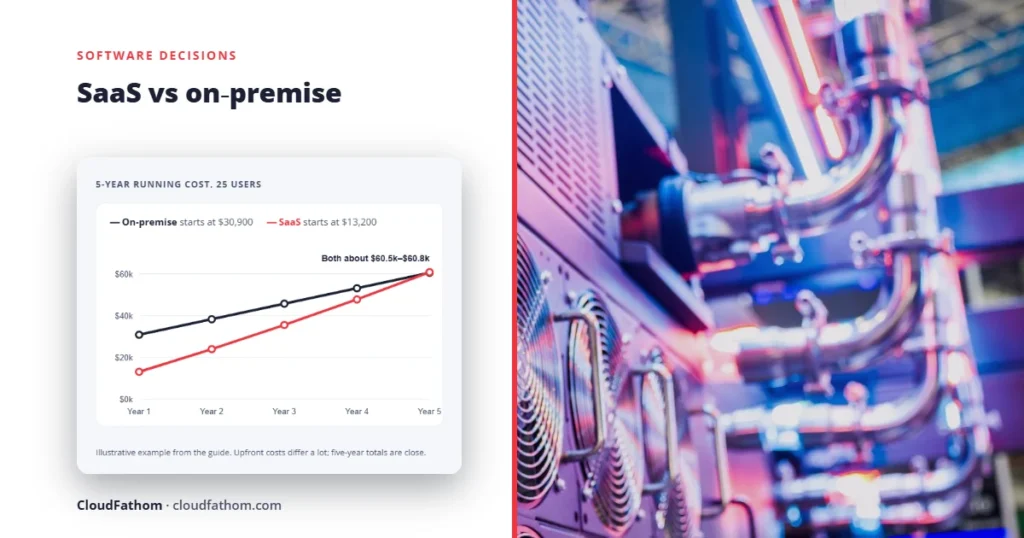
To show how this plays out, here is an illustrative example for a business with 25 users. The figures below are assumptions we chose to make the maths easy to follow, not market prices. Your own quotes will be different.
- SaaS assumptions: $30 per user per month, rising 7% a year at renewal; $3,000 one-off setup and migration; 2 hours of admin a month at $50 an hour.
- On-premise assumptions: $400 per user licence ($10,000); 20% of the licence cost a year for maintenance from year two; $10,500 for a server, backup and supporting licences; $5,000 installation; 8 hours of IT work a month at $50 an hour; $600 a year for power.
| Year | SaaS (per year) | On-premise (per year) | SaaS running total | On-premise running total |
|---|---|---|---|---|
| 1 | $13,200 | $30,900 | $13,200 | $30,900 |
| 2 | $10,830 | $7,400 | $24,030 | $38,300 |
| 3 | $11,504 | $7,400 | $35,534 | $45,700 |
| 4 | $12,225 | $7,400 | $47,759 | $53,100 |
| 5 | $12,997 | $7,400 | $60,756 | $60,500 |
Two things stand out. First, the shape is completely different: on-premise costs more than twice as much in year one, while SaaS costs more every year after that. Second, after five years the totals are almost the same. Change a single assumption (a bigger price rise, more IT hours, a hardware refresh in year five, or a major version upgrade) and the winner flips.

That is why there is no universal answer to “which is cheaper”. It depends on your numbers, how long you plan to keep the system and how much your IT time really costs. Plug your own figures into our Cloud vs On-Premise Cost Calculator to see where your break-even point is. If you already use SaaS and the bill keeps growing, our guide to cutting cloud costs covers the quick wins.
Budgeting and accounting
The way you pay matters as well as the amount. An upfront on-premise purchase is usually treated as a capital expense and spread over several years, while a subscription is usually an operating expense paid as you go. Some finance teams prefer one over the other for tax or cash-flow reasons, so ask your accountant how each option would be treated in your business.
Security: who is responsible for what?
A common belief is that SaaS is less secure because your data sits on someone else’s servers. Another is that SaaS is fully secure because the vendor handles it. Both are wrong.
With on-premise software, you are responsible for every layer: the building, the hardware, the network, the operating system, the application and the data. With SaaS, the vendor takes over the physical data centre, the servers, the network and the application itself. But some jobs never move. Microsoft’s shared responsibility model says that whatever the deployment type, the customer always keeps responsibility for its data, the devices (endpoints) used to access the service, user accounts, and access management.
In practice, that means a SaaS customer still has to:
- Turn on multi-factor authentication and remove accounts when people leave (our cloud security checklist covers this step by step).
- Decide who can see and share what, and review it regularly.
- Keep laptops and phones that connect to the service patched and protected.
- Check whether the vendor’s built-in retention is enough, or whether you need a separate backup.
The difference is in the workload. A big SaaS vendor has full-time security teams patching servers around the clock. A small business running its own server has to find the time to do the same, and unpatched on-premise servers are a common way attackers get in. Our article on the top cloud security issues covers the customer-side mistakes that cause most cloud breaches.
Compliance and data location
On-premise is often chosen for regulated data because you know exactly where it is and who can touch it. But keeping data on your own server does not make you compliant by itself; you still need the right access controls, logging and processes. Many SaaS vendors let you choose the region where your data is stored and sign the contracts that regulations require. For example, healthcare providers in the US can use cloud services for patient data if the vendor signs a business associate agreement, as our guide to HIPAA compliance in the cloud explains.
Reliability: what happens when it goes down?
With SaaS, uptime is the vendor’s job, and the big vendors usually publish a service level agreement (SLA). For example, Microsoft offers a financially backed 99.9% monthly uptime commitment for core Microsoft 365 services. Two details matter here. An SLA gives you service credits off your bill if it is missed; it does not pay for your lost sales or wasted staff time. And even the largest providers have bad quarters: Microsoft’s own reported worldwide uptime for Microsoft 365 was 99.526% in the first quarter of 2026, which Office 365 for IT Pros noted was the lowest figure it had recorded since it started tracking in 2013.
With on-premise, uptime depends on your hardware, your power, your backups and how quickly your team can fix things. Users on the local network can keep working when the internet is down, which is a real advantage in places with unreliable connections. But a failed server with no spare and no tested backup can take a business offline for days.
Either way, it helps to know what an hour of downtime actually costs you. Our free Downtime Cost & SLA Calculator turns an uptime percentage into hours and money.
The hidden risk on both sides: the vendor still decides
People often choose on-premise to avoid depending on a vendor. In reality, both models leave you exposed to vendor decisions, just in different ways.
SaaS: prices and terms can change at renewal
Because you never stop paying, a SaaS price rise hits you directly. Microsoft, for example, raised list prices for several commercial Microsoft 365 plans from 1 July 2026; Business Basic went from $6 to $7 per user per month and Business Standard from $12.50 to $14. Existing customers pay the new price from their next renewal after that date. Features can also be moved into more expensive plans, and if the vendor is acquired or shuts down, you have to move. A simple register of every subscription and its renewal date, as described in our guide to SaaS subscription management, makes these changes much easier to catch in time.
On-premise: support ends, and vendors are moving to the cloud
Owning a licence does not mean the software will be supported forever. Some recent examples show how strongly vendors are pushing customers towards subscriptions and the cloud:
- Atlassian ended support for its Server products (including Jira and Confluence Server) on 15 February 2024. It has since announced that most of its Data Center products, including Jira, Jira Service Management and Confluence Data Center, will reach end of life on 28 March 2029, when they become read-only. Bitbucket and Bamboo Data Center are excluded.
- Microsoft ended support for Exchange Server 2016 and 2019 on 14 October 2025. Its replacement for on-premise email, Exchange Server Subscription Edition, still runs on your own servers but requires an active subscription to stay supported.
The lesson: “on-premise” no longer means “buy once, own forever”. Before you commit, check the vendor’s support timeline and whether the product has a future outside the cloud. Tracking these dates is part of good IT governance and technology risk management.
Other options between SaaS and on-premise
This is not a strict either-or choice. Several middle-ground options exist:
- Self-hosted in the cloud: you install the software yourself, but on a virtual server you rent from a cloud provider instead of hardware in your office. You still manage the software, but not the physical machines.
- Private or single-tenant hosting: some vendors run a dedicated copy of their product just for you, which can help with strict security or compliance requirements, usually at a higher price.
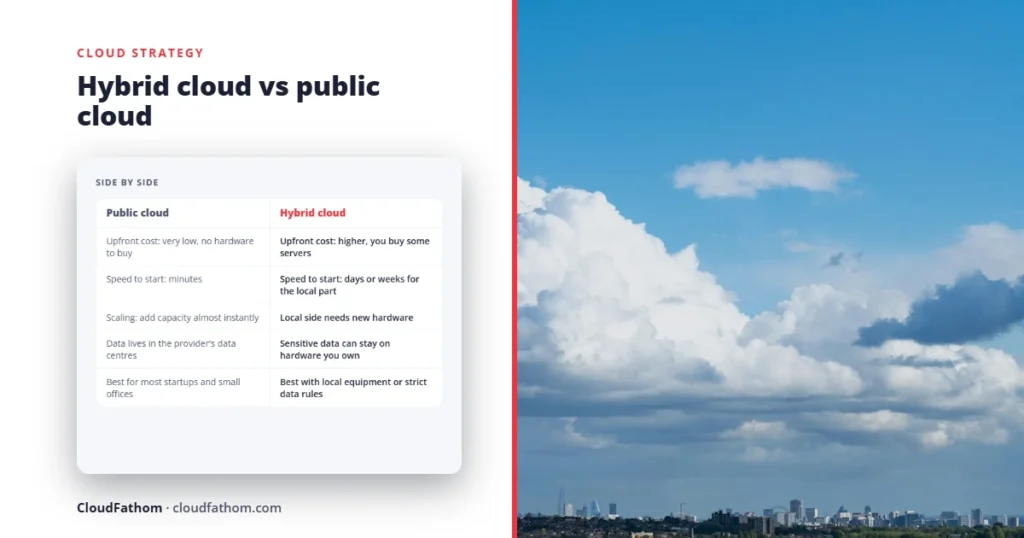
- Hybrid: keep a few systems on-premise (for example, software that controls machinery on a factory floor) and move the rest to SaaS. Our comparison of hybrid cloud and public cloud goes into this in more detail.
Many SaaS products also come with a dedicated option for customers who need more separation. Our guide to multi-tenant vs single-tenant explains the difference and when paying extra for it makes sense.
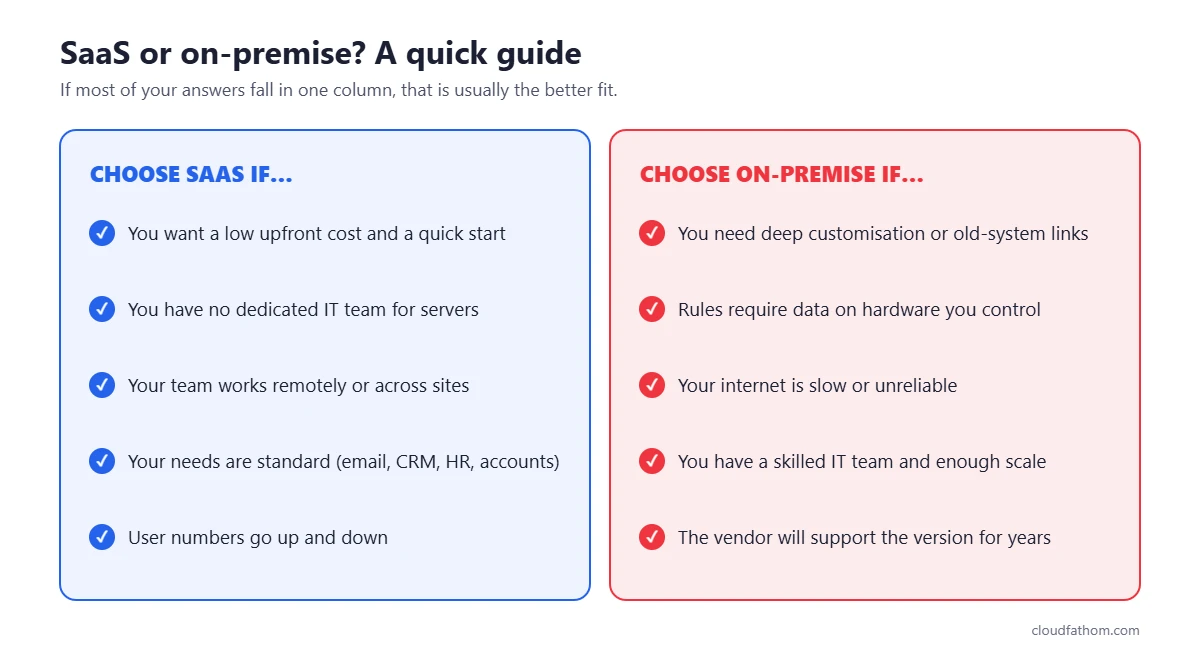
When SaaS is the better choice
- You want to start quickly and avoid a large upfront cost.
- You do not have a dedicated IT team to look after servers.
- Your team works remotely or across several locations.
- Your needs are fairly standard (email, CRM, accounting, HR, project management).
- Your user numbers go up and down and you want to pay only for what you use.
When on-premise is the better choice
- You need deep customisation or tight integration with older systems the vendor cannot support. (Sometimes custom software is the better answer here.)
- Contracts or regulations require data to stay on hardware you control.
- Your sites have poor or unreliable internet, and the work cannot stop when the connection drops.
- You have a skilled IT team and the scale to run servers efficiently.
- You plan to keep the same system for many years and have checked that the vendor will keep supporting it.
A quick decision checklist
Answer these questions before you decide. If most of your answers point one way, you have your answer.
- What is the five-year total cost of each option, including staff time and hardware replacement?
- Who on your team will patch, back up and monitor an on-premise system, and do they have the time?
- Do any laws, contracts or customers require your data to be stored in a specific place?
- How much does an hour of downtime cost you, and which option handles failure better?
- How much customisation do you really need, compared with what the SaaS product already offers?
- Can you export all your data in a usable format if you leave the SaaS vendor?
- How long will the vendor support the on-premise version, and what happens after that?
If you decide to move from on-premise to SaaS, plan the switch in stages rather than all at once. Our 90-day cloud migration plan walks through the process step by step.
Frequently asked questions
Is SaaS cheaper than on-premise?
Usually at the start, not always over time. SaaS has a much lower upfront cost, but you pay every year. On-premise costs more in year one and less in later years. Over five years the totals can be close, so it depends on your user numbers, IT costs and how long you keep the system.
Is on-premise more secure than SaaS?
Not automatically. On-premise gives you more control, but you are responsible for every security layer, including patching servers. A large SaaS vendor usually secures its infrastructure better than a small business can. With either model, you remain responsible for your data, user accounts and devices.
Can I move from on-premise to SaaS later?
Yes, most vendors offer migration tools or partners to help. The hard parts are usually moving historical data, rebuilding custom features and retraining staff, so allow time for testing before you switch off the old system.
What is the difference between SaaS and cloud?
Cloud is the broad term for computing resources delivered over the internet. SaaS is one type of cloud service where you use finished software. The other main types are IaaS (renting servers and storage) and PaaS (renting a platform to build and run your own applications).
Do I still need backups with SaaS?
Often, yes. The vendor protects its systems against hardware failure, but you are responsible for your data. Deleted files, ransomware on a synced device or a mistake by a user can still cause data loss, so check what the vendor’s retention covers and add a separate backup if it is not enough.
Sources
- Microsoft Learn: Shared responsibility in the cloud
- Atlassian: Server end of support
- Atlassian: Data Center end of life
- Microsoft Exchange Team: Support for Exchange Server 2016 and 2019 ends today
- Microsoft Exchange Team: Upgrading to Exchange Server SE
- Office 365 for IT Pros: Microsoft 365 quarterly uptime number sinks to new low
- Office Watch: Microsoft 365 price increases from July 2026
- AWS: The difference between SaaS and on-premises