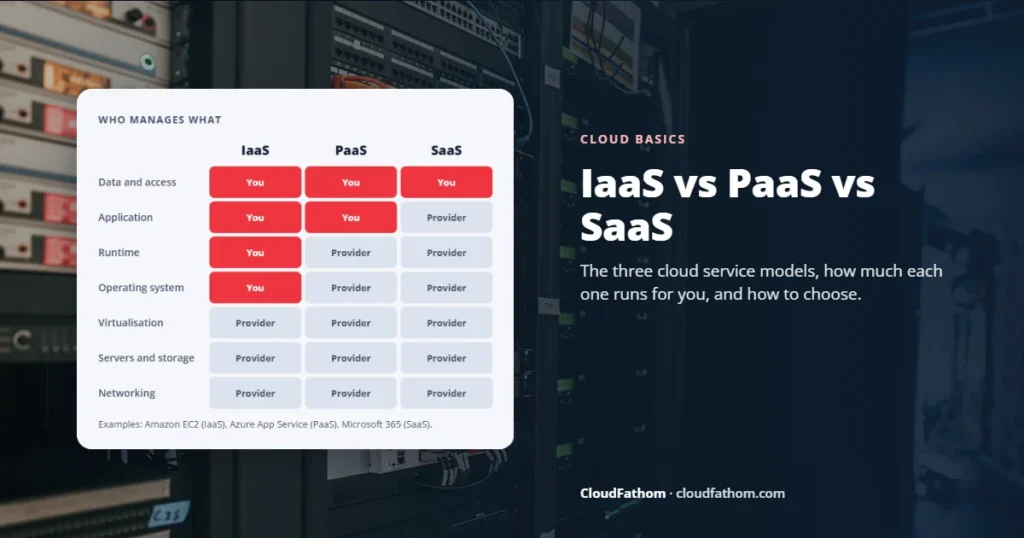
Short answer: IaaS, PaaS and SaaS are the three main types of cloud service, and the difference is how much the provider runs for you. With IaaS (infrastructure as a service) you rent virtual servers, storage and networks, and you manage the operating system and everything above it, for example Amazon EC2. With PaaS (platform as a service) you upload your code and the provider runs the servers and runtime, for example Azure App Service. With SaaS (software as a service) you simply use finished software in a browser, for example Microsoft 365. More control means more work; less work means less control.
Almost every cloud product fits one of three labels: IaaS, PaaS or SaaS. The acronyms sound technical, but the idea behind them is simple. They describe how much of the technology the provider looks after, and how much is left for you.
This guide explains the difference in plain English, gives real examples from AWS, Microsoft Azure and Google Cloud, shows who is responsible for what, and walks through the same project built three different ways so you can see the trade-offs for yourself.
Key takeaways
- IaaS gives you the most control and the most work: you look after the operating system, software, security patches and data.
- PaaS lets developers focus on code. The provider handles servers, operating systems and scaling.
- SaaS is ready-made software. You manage users, settings and your data, and the provider does the rest.
- You are never fully off the hook. In every model you stay responsible for your data, user accounts and access.
- Most businesses use all three at once, for example Microsoft 365 for email, a PaaS service for a custom app and a few virtual machines for older software.
The simplest way to tell them apart
Imagine you want to put a booking website online. There are three cloud ways to do it:
- IaaS: rent a virtual server, install an operating system, a web server, a database and your booking app, then keep all of it patched and running.
- PaaS: write or buy the booking app, upload the code to a platform that runs it, and let the platform handle the servers, scaling and operating system updates.
- SaaS: sign up for an online booking tool, add your services and prices, and start taking bookings the same day.
The result looks similar to your customers. What changes is how much you build, how much you control and how much you have to maintain.
IaaS vs PaaS vs SaaS: comparison table
| IaaS | PaaS | SaaS | |
|---|---|---|---|
| What you get | Virtual servers, storage and networks | A ready platform to run your own code | Finished software, ready to use |
| Main users | IT and infrastructure teams | Developers | Everyone in the business |
| You manage | Operating system, runtime, apps, data, access | Your code, data and access | Users, settings and data |
| Provider manages | Hardware, data centres, virtualisation | Everything in IaaS plus operating system, runtime and scaling | Everything, including the application |
| Control | Highest | Medium | Lowest |
| Setup effort | Highest | Medium | Lowest |
| Typical pricing | Pay for resources used (compute time, storage, data transfer) | Pay for the plan, instances or usage your app needs | Subscription, usually per user per month |
| Good for | Moving existing servers, special software, full control | New web apps, APIs and custom software | Email, CRM, accounting, collaboration |
Who is responsible for what?
The clearest way to see the difference is the shared responsibility model. The table below follows the version Microsoft publishes for its cloud, and AWS and Google Cloud describe the same idea in a similar way.

| Responsibility | On-premise | IaaS | PaaS | SaaS |
|---|---|---|---|---|
| Physical data centre, network and servers | You | Provider | Provider | Provider |
| Operating system | You | You | Provider | Provider |
| Network controls | You | You | Shared | Provider |
| Applications | You | You | Shared | Shared |
| Devices used to access it | You | You | You | Shared |
| Data, user accounts and access | You | You | You | You |
The last row is the one people forget. Even with SaaS, the provider does not decide who can see your files, does not stop staff using weak passwords and does not remove a former employee’s account for you. Our guide to the top cloud security issues shows how most breaches come from that customer side of the line.
Real examples from AWS, Azure and Google Cloud
The big cloud providers sell services in every category. These are well-known examples of each type:
| Type | AWS | Microsoft | |
|---|---|---|---|
| IaaS: virtual machines | Amazon EC2 | Azure Virtual Machines | Compute Engine |
| PaaS: app platforms | AWS Elastic Beanstalk | Azure App Service | App Engine |
| PaaS: managed databases | Amazon RDS | Azure SQL Database | Cloud SQL |
| Serverless functions | AWS Lambda | Azure Functions | Cloud Run functions |
| SaaS | Amazon Connect (contact centre) | Microsoft 365, Dynamics 365 | Google Workspace |
Outside the big three, familiar SaaS examples include Salesforce, Slack, Zoom, Shopify, Dropbox and QuickBooks Online. Popular PaaS options for smaller teams include Heroku and DigitalOcean App Platform. For a side-by-side look at providers beyond AWS, see our guide to AWS alternatives. For the data transfer costs that sit on top of every model, see egress fees explained.
A common trap: “managed” does not mean SaaS. A managed database such as Azure SQL Database is PaaS, because you still design the tables, own the data and write the queries. SaaS means a complete application that end users work in directly.
Examples of each model in a real business
IaaS examples
- Moving an existing server application to the cloud without rewriting it, often called “lift and shift”.
- Running software that needs a specific operating system or full administrator access.
- Spinning up test environments for a few days and switching them off afterwards.
- Renting powerful GPU servers for a short AI training or data analysis job.
PaaS examples
- A customer portal or booking system built by your developers.
- An API that connects your website to your stock or order system.
- A managed database behind a custom app, so nobody has to patch the database server.
- Small automation jobs that run only when something happens, using serverless functions.
SaaS examples
- Email, calendars and documents with Microsoft 365 or Google Workspace.
- Customer relationship management with Salesforce or HubSpot.
- Accounting with Xero or QuickBooks Online.
- Team chat and video calls with Slack, Teams or Zoom.
The same project three ways
Back to the booking website. Here is how the work compares in practice:
| IaaS | PaaS | SaaS | |
|---|---|---|---|
| Time to launch | Days to weeks | Days | Hours |
| Skills needed | Server administration plus development | Development | None beyond setup |
| Ongoing work | Patching, backups, monitoring, scaling | Updating your own code | Managing settings and users |
| Customisation | Anything you can build | Anything your code can do | Only what the vendor offers |
| Cost pattern | Pay for servers whether busy or not, unless you scale them down | Pay for the platform and usage | Fixed monthly fee, often per user or per location |
| Biggest risk | Unpatched servers and surprise bills | Lock-in to one platform’s way of working | Price rises and features you cannot change |
For a small business that just needs online bookings, SaaS usually wins. If bookings are your core product and you need features nobody sells, PaaS is the usual middle path. IaaS makes most sense when you already have software that expects its own server. If you are also weighing cloud against your own hardware, our guide to SaaS vs on-premise compares the costs over five years.
Beyond the big three: serverless, containers and more
You will also see a few newer labels. They sit between or alongside the classic three:
- FaaS or serverless functions (AWS Lambda, Azure Functions, Cloud Run functions): you upload small pieces of code that run only when triggered, and you pay for the time they run. It is often treated as a type of PaaS.
- CaaS or managed containers (Amazon EKS, Azure Kubernetes Service, Google Kubernetes Engine): the provider runs the container platform and you run your apps in containers. It sits between IaaS and PaaS.
- DaaS (desktop as a service): full Windows desktops streamed from the cloud to staff devices.
Each of these layers can be shared between customers or dedicated to one. If you want to understand what that means for cost and security, read our guide to multi-tenant vs single-tenant architecture.
How big is each market?
SaaS is still where most cloud money goes, but infrastructure and platform services are growing faster. Gartner’s November 2024 forecast put worldwide public cloud spending at about $723 billion for 2025, split roughly like this:
| Segment | Forecast 2025 spending | Growth vs 2024 |
|---|---|---|
| SaaS (cloud application services) | $299.1 billion | 19.2% |
| IaaS (cloud system infrastructure services) | $211.9 billion | 24.8% |
| PaaS (cloud application infrastructure services) | $208.6 billion | 21.6% |
How to choose the right model
You do not pick one model for the whole business. Pick per workload by asking:
- Does good software for this already exist? If yes, start with SaaS. Building your own email or accounting system rarely makes sense.
- Is this a custom app your team is building? PaaS lets developers ship faster without hiring someone to run servers.
- Does it need a specific operating system, old software or full control? That points to IaaS.
- Who will patch and monitor it? If nobody has the time, avoid IaaS for that workload.
- How easily can you leave? Check data export for SaaS and how tied your code is to one platform for PaaS.
If you are planning a move to the cloud, our 90-day cloud migration plan shows how to decide this workload by workload. Once you are running, our Cloud vs On-Premise Cost Calculator and guide to cloud cost optimisation help keep the bill under control.
Common mistakes to avoid
- Using IaaS by default. Copying old servers into the cloud unchanged often costs more than expected, because virtual machines charge for every hour they run.
- Assuming SaaS means no security work. You still own your data, user accounts and settings.
- Calling every managed service SaaS. A managed database or app platform is PaaS; you still build on it.
- Ignoring lock-in. PaaS and serverless features can tie your code to one provider. Decide up front how portable it needs to be.
- Losing track of subscriptions. SaaS tools pile up quickly. Our guide to SaaS subscription management shows how to keep them under control.
Frequently asked questions
What is the main difference between IaaS, PaaS and SaaS?
How much the provider manages. With IaaS the provider runs the hardware and you manage the operating system and everything above it. With PaaS the provider also runs the operating system and runtime, so you only manage your code and data. With SaaS the provider runs the whole application and you just use it.
Is AWS IaaS, PaaS or SaaS?
All three. AWS is a provider, not a single model. Amazon EC2 is IaaS, AWS Elastic Beanstalk and Amazon RDS are PaaS, and Amazon Connect is a SaaS contact-centre product. The same is true of Microsoft and Google.
Is Microsoft 365 SaaS?
Yes. Microsoft 365 apps such as Outlook, Teams and Word online are delivered as finished software that Microsoft runs for you. Azure, by contrast, offers IaaS and PaaS services that you build on.
Is Salesforce SaaS or PaaS?
Its CRM products are SaaS: you sign in and use them. Salesforce also offers a platform for building custom apps on top of its CRM, which works more like PaaS. Many companies use both.
Which is cheapest: IaaS, PaaS or SaaS?
It depends on the job. SaaS usually costs least to start and needs no technical staff. IaaS can be cheap for steady workloads if someone manages it well, but staff time and idle servers add up. PaaS often sits in the middle. Compare total costs, including people’s time, not just the price list.
Is serverless the same as PaaS?
Serverless functions are usually treated as a type of PaaS. The difference is that you do not keep an app running all the time; your code runs only when something triggers it, and you pay only for that running time.
Sources
- Microsoft Learn: Shared responsibility in the cloud
- Microsoft Azure: What are IaaS, PaaS and SaaS?
- Google Cloud: PaaS vs IaaS vs SaaS
- AWS Builder Center: IaaS vs PaaS vs SaaS on AWS
- Google Cloud: Cloud Run functions (formerly Cloud Functions) release notes
- Gartner: Worldwide public cloud end-user spending forecast for 2025